
GraphCrunch
A Tool for Large Network Analyses
Thank you for your interest in GraphCrunch! This version of the software is no longer supported. A new version (GraphCrunch2) is available.
About · On-line GraphCrunch · Download · Documentation · Contact us
About
T. Milenkovic, J. Lai, and N. Przulj, GraphCrunch: A Tool for Large Network Analyses, BMC Bioinformatics, 9:70, January 30, 2008. Highly accessed.
GraphCrunch is a software tool for analyzing large biological and other real-world networks and comparing them against random graph models. Finding adequate null-models for biological networks is a challenge and thus GraphCrunch addresses this research problem. It generates random networks (with the number of nodes and edges within 1% of those in the real-world networks) for user-specified random graph models and evaluates the fit of a variety of network models to real-world networks with respect to a series of global and local network properties. Furthermore, it can be easily upgraded to include additional network models and properties. GraphCrunch has parallel computing capabilities: processing can be performed in a parallel fashion by distributing jobs over a compute cluster.
GraphCrunch is created by T. Milenković, J. Lai, and N. Pržulj at the School of Information and Computer Science at UC Irvine.
On-line GraphCrunch
Online GraphCrunch is no longer supported and is not up-to-date with the latest features of GraphCrunch2. If you would like to have an online version of GraphCrunch 2, keep in touch with us by sending an email to natasa.przulj@mbzuai.ac.ae.
Download
GraphCrunch runs under Linux, MacOS, and Windows Cygwin. The versions for Linux and MacOS are statically compiled and thus are ready to use after downloading and unpacking the compressed archive. Due to the licensing issues, the Windows Cygwin version requires the LEDA Cygwin license and the gcc compiler (we recommend LEDA 5.0.1 and the gcc 3.4). See the Documentation for further details.
Get the GraphCrunch software package:
Note that an updated version of GraphCrunch (v. 1.02) is available. This version was implemented based on the Orbit Counting Algorithm (ORCA), and it runs faster than the older version.
System Requirements
- We recommend that Perl 5.6+ as well as dialog 0.3+ or Xdialog are also installed for each of the three operating systems.
- The system needs to have up to 20MB of disk space available (depending on the operating system) for installing GraphCrunch.
- Note that processing a large number of model networks may put a demand on the available disk space in the system (storing a single network takes about 600 KB of disk space). We recommend processing of up to 30 networks per network model.
Instructions for Cygwin
Notes for Cygwin:
- Due to licensing issues, you must compile the GraphCrunch code yourself.
- This requires the appropriate LEDA license.
Steps to follow:
- After downloading the GraphCrunch compressed archive, unpack it by running the following command:
zcat graphcrunch-DD-MMM-YYYY.tar.gz | tar vxf –where “DD-MMM-YYYY” corresponds to the date of the latest release. This automatically creates the directory named “graphcrunch”.
- Unpack the LEDA compressed archive, named “LEDA-5.x.x-complete-i386-cygwin-g++-x.x.x.tar.gz”.
- Rename the directory created in step 2 above to “LEDA” and move it to “graphcrunch/src” directory (i.e., you should get “graphcrunch/src/LEDA”).
- Edit “graphcrunch/src/Makefile” so that
LEDA_DIR = LEDA - On Cygwin command line, type the following:
cd graphcrunch/src/
make
make install
cd ..
Note: Your version of gcc/g++ compiler needs to match the version of gcc/g++ used in LEDA.
The GraphCrunch is now ready to use. See the Documentation for further instructions.
Documentation
Section 1: System Requirements
GraphCrunch runs under Linux, MacOS, and Windows Cygwin.
The versions for Linux and MacOS are statically compiled and thus are ready to use after downloading and unpacking the compressed archive. Due to the licensing issues, the Windows Cygwin version requires the LEDA 5.0.1 Cygwin license and the gcc 3.4 compiler. Note that if you intend to make modifications to the Linux or MacOS versions of GraphCrunch, you will need the LEDA licenses for these operating systems in order to compile your changes.
We recommend that Perl 5.6+ as well as dialog 0.3+ or Xdialog are also installed for each of the three operating systems.
The system needs to have up to 20MB of disk space available (depending on the operating system) for installing GraphCrunch.
GraphCrunch is primarily intended for use on graphs with fewer than 10000 nodes and 50000 edges. The memory and CPU requirements increase considerably when processing larger graphs, or particularly dense graphs.
Note that processing a large number of model networks may put a demand on the available disk space in the system (storing a single network takes about 600 KB of disk space). We recommend processing of up to 30 networks per network model.
Section 2: Input Graph Format
Input data graphs should be in either LEDA graph format (.gw) or “edge list” format (.txt). Output model networks are in LEDA graph format. A description of the LEDA graph format is available here.
The “edge list” text file format is simply a graph adjacency list, i.e., a list of node pairs (edges of the network) separated by tabs or spaces, with one node pair per line. An example of an “edge list” text file representing a “triangle” graph is:
node1 node2
node1 node3
node2 node3
The current implementation of GraphCrunch deals with undirected, simple (i.e., no loops or multiple edges) graphs. Thus, for either of the above two formats, GraphCrunch will remove self-loops, duplicate edges, and edge directions. Also, the current version of GraphCrunch does not account for labels on nodes or edges. Thus, even though input graphs in LEDA format may have labels on nodes and edges, LEDA parameter types of node and edge labels will be modified by GraphCrunch as necessary for program execution. Similarly, even though input graphs in “edge list” formats may have a third “edge weight” (or “edge label”) column, all edge weights (and node labels) are currently ignored.
Section 3: Using GraphCrunch
3.1 Installation
You can download GraphCrunch here.
After downloading compressed archive, unpack it by running the following command:
zcat graphcrunch-DD-MMM-YYYY.tar.gz | tar vxf –
where “DD-MMM-YYYY” corresponds to the date of the latest release. A directory called “graphcrunch” will be created containing subdirectories described bellow.
Detailed instructions for Cygwin are available here.
3.2 Implementation
After unpacking and installing GraphCrunch, you will be presented with the following directory structure.
| Directory | Content |
|---|---|
./run-dialog |
A text User Interface wizard for running GraphCrunch. |
./crunch |
A command-line tool for running GraphCrunch. |
README.txt |
The “readme” file with the explanations on how to use GraphCrunch. |
batch/ |
Scripts and temporary data for remote batch processing. |
contrib/ |
Scripts and utilities that use additional software (e.g., gnuplot or R); users can contribute with their own add-ons. |
data/ |
Folder containing sets of intermediate files. |
doc/ |
Advanced documentation for extending the software package and troubleshooting. |
plots/ |
Visualized output files for the user-friendly graphical interpretations of the results. |
sample_graphs/ |
Some sample graphs to try out. |
scripts/ |
Scripts that use the results of network model generators and programs computing network properties to create the statistics that summarize the results. |
src/ |
Source code (for advanced users/developers). |
tmp/ |
Temporary data. |
GraphCrunch is implemented in C++, Perl, and Bourne Shell scripts. The programs for generating model networks and calculating network properties are implemented using C++ and the LEDA library for combinatorial and geometric computing. Shell scripts collect the output of these programs and create the results of the analyses and graphical and tabular representation of the statistics summarizing the results. The programs and the shell scripts are organized in the directories as presented in the table above. This organization allows for easy extendibility of the software to include additional network models and measures. For example, to add a new model, the user only needs to put a model generator program in the src/ directory and to place the script that runs the new program in the scripts/ directory. The same flexibility applies to the addition of new network properties. In addition to the easy extendibility, GraphCrunch has built-in parallel computing capabilities: it distributes its processes over a user specified cluster of machines.
3.3 Running GraphCrunch
There are three ways of running GraphCrunch: via the command-line interface, the run-dialog interface, and the on-line web interface. Run-dialog interface is available for the Linux and MacOS versions of GraphCrunch (but not for Cygwin). Both command-line and run-dialog interfaces allow for large-scale scientific computing network analysis and modeling projects. On-line web user interface is provided for non-expert users and those with less intensive processing needs; we recommend that first-time users start with on-line GraphCrunch.
3.3.1 The command-line interface
The command-line interface allows for specifying all of the following in a single command:
- the real-world network (input graph) to be processed,
- random graph models against which the data is to be compared,
- the number of networks to be generated per random graph model,
- network properties and comparisons between the data and the model networks,
- the name of the output data file.
Network properties and models currently supported by GraphCrunch are presented in tables below.
| Supported by GraphCrunch | |
|---|---|
| Global properties | Degree distribution |
| Clustering coefficient | |
| Clustering spectrum | |
| Average diameter | |
| Spectrum of shortest path lengths | |
| Local properties | Relative graphlet frequency distance (RGF-distance) [6] |
| Graphlet degree distribution agreement (GDD-agreement) [7] | |
| Models | Erdös–Rényi random graphs [1] |
| Random graphs with the same degree distribution as the data [2] | |
| Scale-free Barabasi-Albert model graphs [3] | |
| N-dimensional geometric random graphs [4] | |
| Stickiness model graphs [5] |
Tables: Network properties and models currently supported by GraphCrunch.
The syntax for the command is:
./crunch -f graph_filename [-m model] [-p parameter] [-c comparison] [-o output filename] [-n num random graphs] [-r machine]
Example of the command (explanation of the command fields is provided below) is:
./crunch -f Net1.gw -p "diameter-avg clustcoef-avg graphlet-count" -c "degree-distrib diameter-spectrum clust-spectrum gdd-agreement:amean gdd-agreement:gmean graphlet-dist" -m "er er_dd geo sf sticky" -n 3 -o output_example.tsv
Note: Before running any commands, make sure you “cd” to the graphcrunch directory.
After you run “./crunch” command on a graph file (e.g., Net1.gw) for the first time, it is stored in the data set “collection” located in the graphcrunch/data directory. Each input graph file becomes a “data set” named after the graph file (without the “.gw” or “.txt” extension).
The second time you want to run calculations on Net1.gw, use “-d” instead of “–f” (i.e., “./crunch -d Net1.gw”) in the command example above. This will overwrite the previous analysis.
Alternately, you can use “-F” option instead of “–f” (or “–d”), which will either add a graph file (if one with the same name does not already exist) or look for a graph in the collection with the same name (but will not overwrite the existing graph).
Network models that can be specified in part “-m model” of the command are specified in the “Models” table above, and are denoted by “er”, “er_dd”, “sf”, “geo”, and “sticky” in the command, respectively (without the quotes).
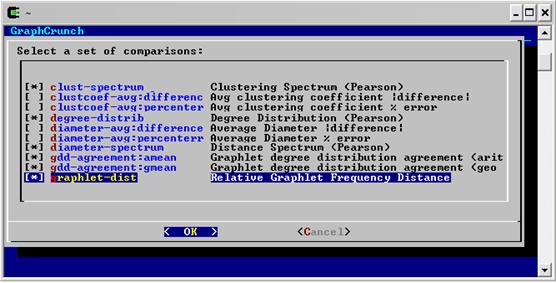
Network properties in GraphCrunch are subdivided into parameters (denoted by “-p” in the above command) and comparisons (denoted by “-c” in the command).
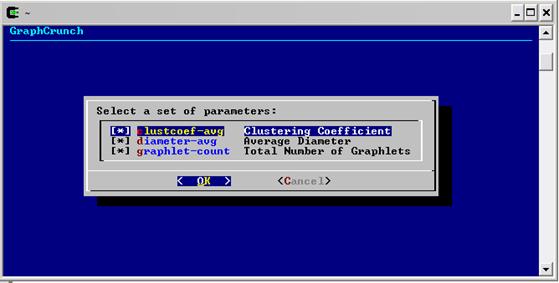
The “parameters” denote network properties computed on both the data and model networks.
| Parameter notation in GraphCrunch | Parameter description |
|---|---|
clustcoef-avg |
Average clustering coefficient of the network |
diameter-avg |
Average diameter of the network |
graphlet-count |
Total number of graphlets in the network |
Additionally, average diameters and average clustering coefficients of model networks can be compared to those of a real-world network (i.e., can be used as “comparisons”, with “–c” in the command) in two ways, as presented below.
| Notation | Explanation |
|---|---|
diameter-avg:difference |
Absolute values of difference between the average diameters of two networks |
clustcoef-avg:difference |
Absolute values of difference between the average clustering coefficients of two networks |
diameter-avg:percenterr |
Percentage difference between the average diameters of two networks |
clustcoef-avg:percenterr |
Percentage difference between the average clustering coefficients of two networks |
“Comparisons” are properties of a real-world network that are compared against those of model networks.
| Comparison notation in GraphCrunch | Comparison description |
|---|---|
degree-distrib |
Degree distribution |
clust-spectrum |
Clustering spectrum |
diameter-spectrum |
Spectrum of shortest path lengths |
gdd-agreement |
Graphlet degree distribution agreement (GDD-agreement) |
graphlet-dist |
Relative graphlet frequency distance (RGF-distance) |
The degree distributions, the clustering spectra, and the shortest path length spectra of two networks are compared by the Pearson’s correlation.
GDD-agreements and RGF-distances are calculated as in [7] and [6], respectively. GDD-agreement can be computed as either arithmetic or a geometric mean. To distinguish between these two, use the notation presented below.
| Notation | Explanation |
|---|---|
gdd-agreementgdd-agreement:amean
|
GDD-agreement, arithmetic mean |
gdd-agreement:gmean |
GDD-agreement, geometric mean |
GraphCrunch supports parallel processing. A user can distribute the GraphCrunch processing over a cluster of machines, by including –r "machine1 machine2 machineN" in the above command, where “machine1”, “machine2” and “machineN” are machine names.
3.3.2 The run-dialog interface
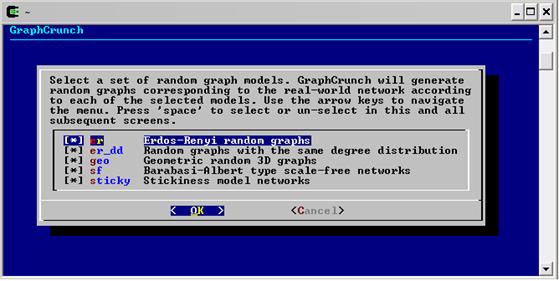
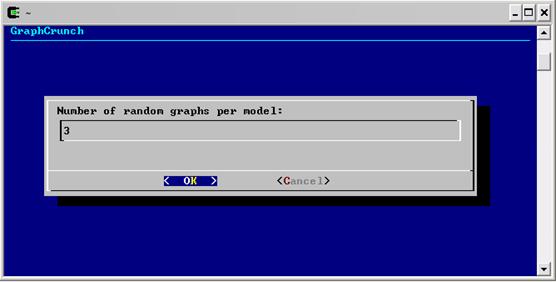
The run-dialog interface provides the same functionality as the command-line interface, but in a more user-friendly manner: it guides a user through the sequence of screens, step by step. It is more “error-forgiving” than the command line-interface.
If you have Perl 5 and dialog installed (we recommend Perl 5.6+ as well as dialog 0.3+ or Xdialog), you may start run-dialog interface with the following command:
./run-dialog <input_graph_name>
Note: The first time you run run-dialog interface, you need to add a data set. If don’t have any graph files, you can try one of the samples in the sample_graphs directory. To add a data set, you can either provide the input graph on the command line by typing “./run-dialog <input_graph_name>” or run just “./run-dialog” command and then choose “[Add dataset]”.
After this command is issued, you need to perform (un)selecting of checkboxes in order to specify the following:
- the random graph models,
- the number of networks per random graph model,
- network parameters and comparisons,
- the name of the output file.
The processing with the specified selections can either start immediately, (by choosing “Done - Run crunch” option), or “advanced options” can be configured to change network models, parameters, comparisons, or the machines over which to distribute the processing.
To navigate between menu options, use the up/down arrow keys. To navigate between buttons, use the left/right or tab keys. Press space to toggle a checkbox.
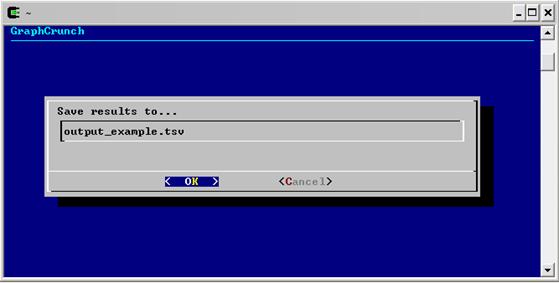
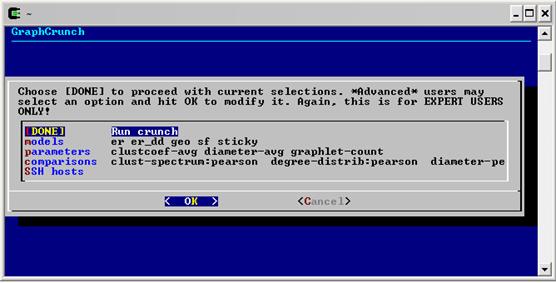
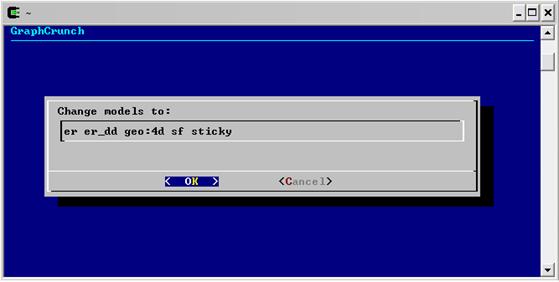
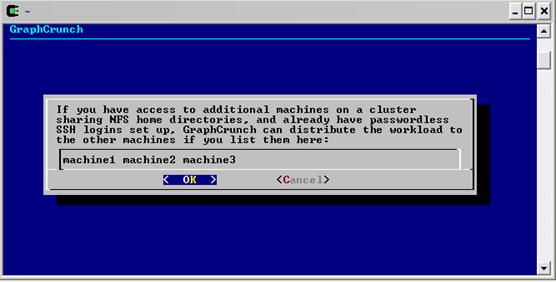
The example screenshots for using the run-dialog interface are available below.
Example of using the run-dialog interface
 (A) |
 (B) |
 (C) |
 (D) |
 (E) |
 (F) |
 (G) |
 (H) |
Sequence of steps in the run-dialog interface: (A) choosing network models; (B) specifying the number of random graphs per network model; (C) choosing the parameters; (D) choosing the comparisons; (E) specifying the name of the output file; (F) proceeding with processing with the current selections (by choosing “Done - Run crunch” option), or selecting to change network models, parameters, comparisons, or to specify the machines over which to distribute the processing; (G) this screen appears when changing network models is selected in the screen presented in panel F; in this example, the default of geo:3d is changed to geo:4d; (H) this screen appears when specifying the list of machines (SSH hosts) over which to distribute the processing is selected in the screen presented in panel F.
3.3.3 On-line web interface
The GraphCrunch on-line web user interface is intended for less experienced users and those with less intensive processing needs. It is a user-friendly interface, and we recommend it for first-time GraphCrunch users.
The on-line web interface is no longer available (see On-line GraphCrunch).
Section 4: Output and Results
GraphCrunch creates three types of output: the tabular output file, the set of intermediate files, and the visualized output.
4.1 The tabular output file
The tabular output file is a spreadsheet of tab-separated values (.tsv) that contains summarized output statistics. An example of the GraphCrunch output file in which network “Net1.gw” is compared against five network models with three random networks per network model and with respect to all network properties currently supported by GraphCrunch can be found below.
The command that produces these results is:
./crunch -f Net1.gw -p "diameter-avg clustcoef-avg graphlet-count" -c "degree-distrib diameter-spectrum clust-spectrum gdd-agreement:amean gdd-agreement:gmean graphlet-dist" -m "er er_dd geo sf sticky" -n 3 -o output_example.tsv
An example of the tabular output file
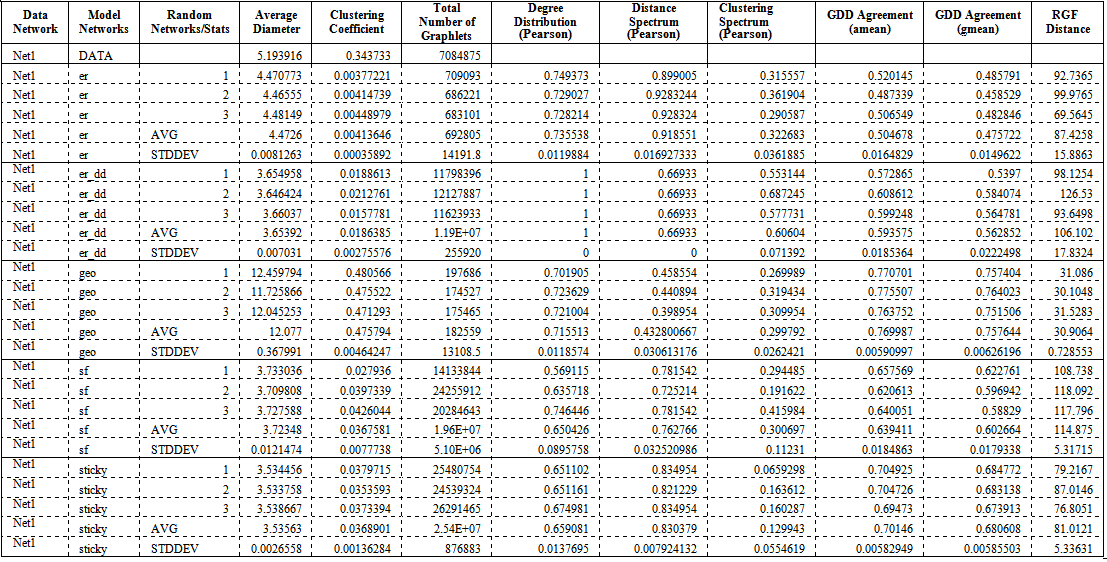
An example of the output file resulting from processing the real-world network Net1.gw by GraphCrunch. The five network models and all of the currently supported properties are presented. Three networks per random graph model were generated (denoted by 1, 2, and 3 in column “Random Networks/Stats”). Thus, the total number of random networks analyzed in this example is 3x5=15. The column denoted by “Data Network” contains the name of the real-world network being analyzed. The column denoted by “Model Networks” contains the names of network models against which the data is being compared (“er”, “er dd”, “sf”, “geo”, and “sticky”). Random graphs from the same network model are denoted by a sequence of integers presented in column “Random Network/Stats”; in the same column, “AVG” and “STDDEV” denote that the fields in these rows contain averages and standard deviations of network properties (given in columns to the right) computed over all random graphs from the given network model that were generated and analyzed by GraphCrunch. The columns denoted by “Average Diameter” and “Clustering Coefficient” contain the average diameter and the average clustering coefficient of a network, respectively. The column denoted by “Total Number of Graphlets” contains the total number of all 2-5-node graphlets in a network. The columns denoted by “Degree Distribution (Pearson)”, “Distance Spectrum (Pearson)” and “Clustering Spectrum (Pearson)” contain the Pearson’s rank correlation coefficients of degree distributions, distance spectra and clustering spectra between the real-world and model networks, respectively. The columns denoted by “GDD agreement (amean)” and “GDD agreement (gmean)” contain the arithmetic and geometric means of GDD-agreements between the real-world and model networks, respectively. Finally, the column denoted by “RGF Distance” contains RGF-distances between the data and model networks.
4.2 The set of intermediate files
The set of intermediate files is stored in the subdirectories of the data/<input-file-name> directory. These files include generated model networks corresponding to the input network, in LEDA graph (.gw) format (they are saved in the subdirectory data/<input-file-name>/models), and the files containing the network properties (e.g., distance spectra, graphlet counts, graphlet degree distributions etc.). The intermediate files allow for additional analyses of the results without performing any additional compute-intensive processing. Also, the tabular output file contains only the statistics of network parameter similarities between the data and the model networks, but not the results from which the statistics were computed that are contained in the intermediate files. For example, the GDD-agreement presented in the output file is a single number between 0 and 1 while the intermediate files contain the actual GDDs for each of the 73 orbits. Thus, intermediate files are needed if one needs to perform an analysis of a particular GDD. Similar holds for other network properties.
4.3 The visualized output
The visualized output is a set of files (in .ps format) that contain user-friendly graphical interpretations of the results presented in the output file. One graphical file (plot) is created per network property. Each of the plots illustrates the fit of the network models to one or more real-world networks with respect to the given property. Thus, it is possible to simultaneously compare the fit of network models to many real-world networks with respect to one property in a single plot. Before executing the plot function of GraphCrunch, the following must be satisfied: (1) the data sets must be processed with “./crunch” command and the corresponding intermediate files must exist in the data/ directory; and (2) “gnuplot” command-line plotting utility must be available on a user’s system. Visualized output files are created by running the plot.sh script (found in the contrib/ directory); the syntax for running this script is:
./contrib/plot.sh -d real-world-network -m model -c comparison -o output-file
where multiple real-world networks or models may be specified, as illustrated in the example below. Some examples of plots are presented below: four network properties for three data sets and five network models per data set have been illustrated. The command used to produce the first example is:
./contrib/plot.sh -d Net1 -d Net2 -d Net3 -m er -m er_dd -m geo -m sf -m sticky -c gdd-agreement:amean -o plot_ex_gdd
Examples of visualized output
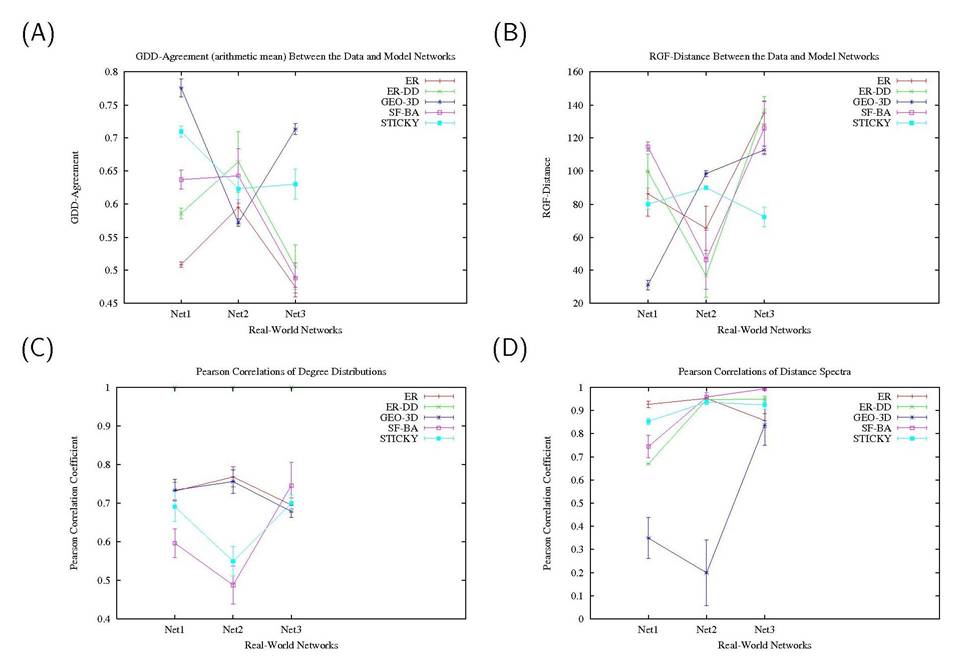
Figure: Examples of plots that illustrate the fit of five network models (ER, ER-DD, GEO-3D, SF-BA, and STICKY) to three data sets (Net1, Net2 and Net3) with respect to four networks properties: (A) GDD-agreement, (B) RGF-distance, (C) the degree distribution, and (D) the distance spectrum. Each point in each of the panels represents the average of the fit of the real-world and model networks with respect to the given property (over model networks belonging to the same random graph model corresponding to the real-world network); the error bars represent one standard deviation above and below the average.
Section 5: Beyond the Basics
GraphCrunch allows considerable extensibility with a little bit of scripting knowledge. See doc/CUSTOMIZING.txt for more details.
Section 6: Known Issues
- In the case you run into a problem when loading .txt input graph files, please make sure that you have the required versions of software as specified in Section 1 above. Alternatively, please work with .gw input graph format.
- In general, avoid spaces in filenames.
- If graphlet counting fails, e.g. due to hardware problems or network issues etc., you may need to run “
./crunch” again. Most of the existing work should be preserved, however.
Section 7: Authors, Credits, and Licensing
GraphCrunch is created by T. Milenković, J. Lai, and N. Pržulj at UC Irvine. Thanks to David Hubin for testing and advice.
Primary contact: natasa.przulj@mbzuai.ac.ae
GraphCrunch is freely available for academic use only. The shell scripts in this distribution may be used for any purpose with proper attribution.
Disclaimer: THE SOFTWARE IS PROVIDED “AS IS”, WITHOUT WARRANTY OF ANY KIND, EXPRESS OR IMPLIED, INCLUDING BUT NOT LIMITED TO THE WARRANTIES OF MERCHANTABILITY, FITNESS FOR A PARTICULAR PURPOSE AND NONINFRINGEMENT. IN NO EVENT SHALL THE AUTHORS OR COPYRIGHT HOLDERS BE LIABLE FOR ANY CLAIM, DAMAGES OR OTHER LIABILITY, WHETHER IN AN ACTION OF CONTRACT, TORT OR OTHERWISE, ARISING FROM, OUT OF OR IN CONNECTION WITH THE SOFTWARE OR THE USE OR OTHER DEALINGS IN THE SOFTWARE.
To simplify installation, we include a copy of the UI::Dialog 1.08 module for Perl, written by Kevin C. Krinke <kckrinke@opendoorsoftware.com> With contributions by Jeroen Bulten <jeroenb@tunix.nl>, Julian Gilbey <jdg@polya.uklinux.net>, and Alfonso E.M. <alfonso@el-magnifico.org>. More details in the scripts/perl/UI-Dialog-1.08 directory. Dialog was created by Thomas E. Dickey et. al.
UI-Dialog is under the GNU Lesser General Public License (GNU LGPL), and is considered separate from the GraphCrunch licensing.
Dialog is under the GNU General Public License (GNU GPL) and is considered separate from the GraphCrunch licensing. As per Section 3b of the GNU GPL we offer to provide a copy of the Dialog 1.1 source code if requested, within the first three years of release.
References
- P. Erdos and A. Renyi. On random graphs. Publicationes Mathematicae, 6, pp 290-297, 1959.
- E. A. Bender and E. R. Canfield. The asymptotic number of labeled graphs with given degree sequences. Journal of Combinatorial Theory A, 6, pp 296-307, 1978.
- Penrose. Geometric Random Graphs. Oxford University Press, 2003.
- A.-L. Barabasi and R. Albert. Emergence of scaling in random networks. Science, 286, 509-512, 1999.
- N. Przulj and D. Higham. Modelling protein-protein interaction networks via a stickiness index. Journal of the Royal Society Interface, 3(10), 711–716, 2006.
- N. Przulj, D. G. Corneil, and I. Jurisica. Modeling Interactome: Scale-Free or Geometric?. Bioinformatics, 20, pp 3508-3515, 2004.
- N. Przulj. Biological Network Comparison Using Graphlet Degree Distribution. Proceedings of the 2006 European Conference on Computational Biology, ECCB ‘06, acceptance rate 18%. Bioinformatics, 23, e177–e183, 2006.
Acknowledgments
This project was supported by the NSF CAREER IIS-0644424 grant.
Citation
T. Milenković, J. Lai and N. Pržulj. GraphCrunch: A tool for large network analyses. BMC Bioinformatics 9, 70 (2008). https://doi.org/10.1186/1471-2105-9-70